



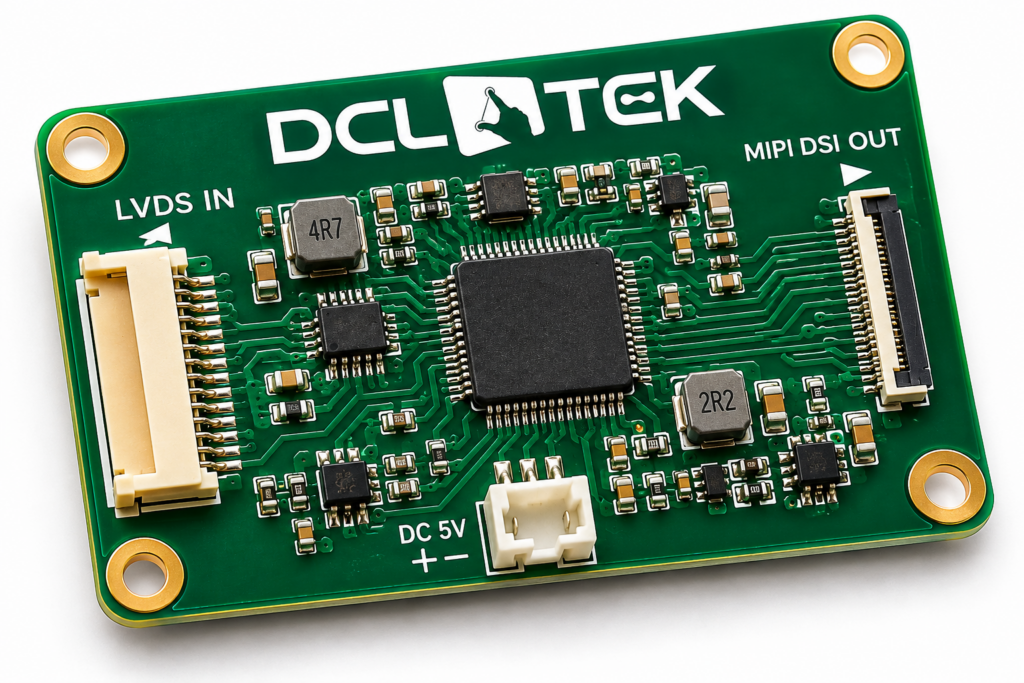
An LVDS to MIPI converter board lets a host with an LVDS video output drive a MIPI DSI display. DCL Technologies, Inc. (DCLTEK) builds these converter boards, off-the-shelf where one fits and custom where your source, panel or enclosure call for it, and supplies them with the display and cable as one tested set. LVDS to MIPI is the most common request we see, but any conversion path between display interfaces is possible, including MIPI to LVDS.
On this page
- Why convert LVDS to MIPI
- Every conversion path
- How the signal path works
- What is on a converter board
- Common bridge chips
- Design checklist
- Off-the-shelf or custom
- When you don’t need a converter
- How DCLTEK supplies it
- FAQ
Why convert LVDS to MIPI
Most of our converter customers have a proven LVDS source, such as an industrial PC, an embedded controller or a video board, and want to use a MIPI DSI display. The converter lets them do it without touching the host.
- Access to modern panels. Many current high-resolution, high-brightness IPS panels are sold only with a MIPI DSI interface. A converter puts them within reach of an LVDS host.
- Better unit cost. MIPI panels ride phone and tablet volumes, so the same size and resolution is often cheaper in MIPI than in LVDS, if an LVDS version exists at all.
- No host redesign. The processor, firmware and certifications you have already invested in stay as they are.
- A way through end-of-life. When an LVDS panel is discontinued, a converter lets a long-lived product adopt a current MIPI replacement instead of a board re-spin.
Every conversion path is possible
LVDS to MIPI is the most common path, but DCLTEK builds converter boards for any combination of source and display interface.
| Your source | Your display | Typical reason |
|---|---|---|
| LVDS | MIPI DSI | Use a modern MIPI panel on an existing LVDS host |
| MIPI DSI | LVDS | Keep a qualified, long-life LVDS panel on a new MIPI-only processor |
| RGB / TTL | MIPI DSI | Drive a MIPI panel from an older parallel-RGB controller |
| RGB / TTL | LVDS | Reach a larger LVDS panel or run a longer cable from a parallel host |
| HDMI or eDP | MIPI DSI or LVDS | Use an embedded panel with a PC-style video output |
How the signal path works
The converter receives the LVDS stream from your host, recovers the pixels and timing, and re-sends them to the panel as MIPI DSI packets. Before the first frame, it also sends the panel’s initialization commands, which an LVDS host has no way to send itself.
Where the converter sits matters. LVDS travels well over a cable, but MIPI DSI does not, so for LVDS to MIPI the converter belongs at the display end: a long LVDS cable from the host, then a short DSI connection to the panel’s flex.
Keep raw DSI short. Do not run MIPI DSI across a long internal cable or between boards more than about 150 mm apart. LVDS reaches 1 to 2 m, so let LVDS cover the distance and keep the DSI link at the panel.
What is on a converter board
- A bridge IC that does the conversion, LVDS to DSI or any other path.
- Panel initialization. MIPI panels need a sequence of setup commands at power-up. On an LVDS to MIPI board, a small on-board controller or memory stores the panel’s init sequence and sends it automatically, so the host needs no software changes.
- Power. A single DC input, typically 5 V, regulated down for the bridge and the panel, with panel power sequencing in the order the datasheet requires.
- Backlight control. Backlight enable and PWM dimming passed through from the host or generated on the board.
- Connectors. The host’s LVDS connector on one side and the panel’s MIPI flex connector on the other, so the cables plug straight in.
- Touch pass-through (optional). Routing for the touch controller’s I²C or USB, so one cable set serves both display and touch.
Common bridge chips
Most converter boards are built around one of a few widely used bridge ICs. Which one fits depends on the conversion path, the panel’s resolution, and single- or dual-link LVDS.
| Bridge IC | Converts | Typical use |
|---|---|---|
| Lontium LT9211 | LVDS, MIPI and RGB in any combination | LVDS to MIPI DSI, plus most other paths, single or dual-link LVDS |
| Toshiba TC358768 | Parallel RGB to MIPI DSI | Older RGB hosts driving MIPI panels |
| TI SN65DSI83 | MIPI DSI to LVDS | Single-link LVDS, up to WXGA-class panels (1280 x 800, 1366 x 768) |
| TI SN65DSI84 | MIPI DSI to LVDS | Single or dual-link LVDS, up to WUXGA (1920 x 1200) |
| TI SN65DSI85 | Dual-channel MIPI DSI to LVDS | Dual-link LVDS, up to WQXGA (2560 x 1600) |
| Toshiba TC358775 | MIPI DSI to LVDS | Single or dual-link LVDS, up to WUXGA (1920 x 1200) |
Design checklist for LVDS to MIPI
- LVDS source format. Single- or dual-link, JEIDA or VESA (OpenLDI) bit mapping, 6-bit or 8-bit color. The converter’s input must match exactly, or colors scramble.
- Resolution and timing. The source should output the panel’s native resolution, pixel clock and blanking. A converter passes pixels through; it doesn’t scale the image.
- The panel’s DSI setup. Lane count, video or command mode, and the panel’s init sequence, from the panel datasheet or the panel maker.
- Power. The board’s input voltage, and power sequencing for logic, video and backlight within the panel’s limits.
- Backlight control. Decide whether the host, the converter or the panel’s LED driver owns enable and dimming.
- Cable lengths. Long LVDS, short DSI. Use twisted-pair or shielded LVDS cable near motors or in vehicles.
- Touch. Plan the touch controller’s connection back to the host.
- Environment. Match the board’s operating temperature and mounting to the product, not the lab bench.
Bring three facts to the first call: your source’s LVDS format (single or dual-link, bit mapping), the panel’s resolution and pixel clock, and the panel’s init sequence or datasheet. With those, DCLTEK can confirm whether an off-the-shelf converter fits or scope a custom board.
Off-the-shelf or custom converter board
| Off-the-shelf converter | Custom converter board | |
|---|---|---|
| Best for | Prototypes, evaluation, common source and panel pairs | Production designs with a fixed source, panel and enclosure |
| Connectors | Standard pinouts; may need adapter cables | Matched to your host and panel, so cables plug straight in |
| Size and mounting | Fixed board outline | Shaped to fit your enclosure and mounting holes |
| Panel setup | Loaded for a supported panel | Programmed with your panel’s init sequence and timing |
| Extras | Display conversion only | Can add backlight driver, touch routing, power input and environmental hardening |
When you don’t need a converter
- A native panel exists. If an LVDS panel at the size and brightness you need is available for your LVDS host, you can skip the extra board. Our LVDS displays and MIPI DSI displays pages list what is available.
- The host has HDMI. A monitor or a smart display with an HDMI input may avoid conversion entirely. See smart displays.
How DCLTEK supplies it
Your DCLTEK salesperson is a qualified display engineer and your single point of contact for both sales and engineering. For a converter project that means:
- One tested set. The panel, converter board and cables are matched and checked together, so they arrive working as a set.
- The right panel first. We help choose the MIPI panel, and check whether a native LVDS panel would avoid the converter, before we recommend one.
- Custom where it pays. When an off-the-shelf board doesn’t fit, we design a converter matched to your source, panel and enclosure.
- Support after production starts. The same contact stays with your program, with long-term supply planning for the panel and the board.
Frequently asked questions
What is an LVDS to MIPI converter?
A small board built around a bridge IC that converts the LVDS video output of a host into MIPI DSI, so the host can drive a MIPI display. It also sends the panel’s initialization commands at power-up, which an LVDS host can’t do.
Can an LVDS host drive a MIPI DSI display?
Yes. An LVDS to MIPI converter board between the host and the panel does the conversion. The host keeps sending standard LVDS video and needs no software changes.
Do you also make MIPI to LVDS converters?
Yes. Any conversion path is possible: LVDS to MIPI, MIPI to LVDS, RGB or TTL to MIPI or LVDS, and HDMI or eDP to an embedded panel.
Where should the converter be mounted?
For LVDS to MIPI, at the display end. LVDS can run 1 to 2 m over a cable, while raw MIPI DSI should stay within about 150 mm, so the converter should sit next to the panel.
Does DCLTEK make custom converter boards?
Yes. DCLTEK supplies off-the-shelf converters where one fits and designs custom converter boards matched to your source, panel, connectors and enclosure.
Can I buy the converter together with the display?
Yes. DCLTEK supplies the panel, converter board and cables as one matched set, so you integrate one tested assembly instead of three separate parts.
Need to drive a MIPI display from an LVDS source?
Send us your source’s LVDS format, the panel’s resolution and the panel datasheet. We’ll tell you whether an off-the-shelf converter fits or scope a custom board, for LVDS to MIPI or any other path.


